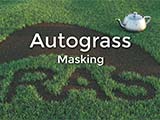
Autograss: one-click grass for V-Ray



Select your object, click Autograss, and you're done. You've got photorealistic grass in V-Ray for 3ds Max.
Autograss works in any scene, from a simple lawn to landscaping an entire city block. It works with all of V-Ray's great features, like shadows, reflections, depth of field, and global illumination, and there's no need to divide your scene into passes or layers.

Autograss uses Happy Digital's advanced memory management system. That means Autograss uses only a fixed amount of RAM no matter how much grass is in the scene, whether it's a one-acre lawn or an entire golf course. No crashes, no nonsense. And it's fully multi-threaded, so all your cores are driven to their full potential.
Autograss includes eleven preset grass types covering the most commonly used grasses. You don't need to model any grass. The scientists at Happy Digital studied radiometrically calibrated photographs to ensure the grass presets have true-to-life shape and color when used with V-Ray's physical cameras and sun / sky system, from sunrise to sunset. In addition, Autograss provides you with mapping and variation to produce special effects like worn-out trails and lawnmower paths.
|
|
 User guide |